
CANopen DeviceDesigner

CANopen DeviceDesigner
an easy-to-use tool for fast and cost-saving design of CANopen devices
Special Features
CANopen DeviceDesigner
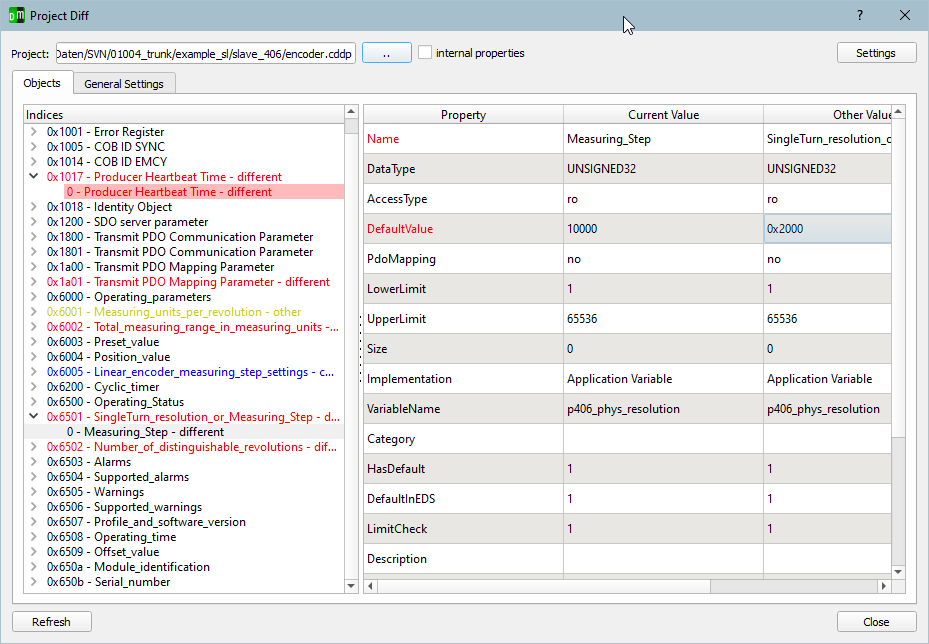
Project comparison
A powerful diff tool is integrated for comparing multiple CANopen DeviceDesigner projects.
Profile files are currently available for the following device and communication profiles:
Device profiles
Profile files are available for various communication and device profiles of the CiA. A profile file includes templates for all types of objects with the standard attributes and a description of the object. Objects can be imported into the CANopen DeviceDesigner, copied and customized to individual characteristics of devices. When using predefined objects the development time shortens significantly and the error prone work of manual input of data falls away.
Following profile files are available:
- CiA 301 – CANopen application layer and communication profile
- CiA 1301 – CANopen FD application layer and communication profile
- CiA 302 – CANopen additional application layer functions
- CiA 401 – Device Profile for Generic I/O Devices
- CiA 402 – Device Profile for Drives
- CiA 418 – Device Profile for Batteries
- CiA 419 – Device Profile for Battery Charger
- CiA 433 – Application Profile for interior rail vehicle lighting
This list is extended continuously. All mentioned profile files are part of the delivery.
Description
The CANopen DeviceDesigner is an easy-to-use tool for fast and cost-saving design of CANopen devices. With a few mouse clicks the object dictionary of the device can be created on the basis of predefined profiles. The CANopen DeviceDesigner creates the object dictionary and initializing functions in C, the electronic data sheet in EDS and XDD format for CANopen FD and a device documentation. Additionally the CANopen DeviceDesigner configures the CANopen stack and CANopen driver under consideration of the device characteristics. So the optimal configuration is given.Object Dictionary
According to the profiles and input the object dictionary is created as C source code file. This is integrated into the application as interface for the protocol stack. It is possible – when configured accordingly – to access the objects of the object dictionary directly as C variable. Alternatively from the application the access to functions is possible via index and subindex.CANopen stack configuration and initializing
According to the adjustments and definitions of the object dictionary a configuration and initializing file in C source code is created. This secures that only used services of the CANopen stack will be compiled and initialized. Resource saving configuration is given by that.Electronic Data Sheet (EDS)
All CANopen devices need an electronic data sheet (EDS) that describes the parameters of the object dictionary electronically. The CANopen DeviceDesigner creates the electronic data sheet in format EDS according to CiA306. The file always reflects the recently generated object dictionary. The automatic generation of the file helps to avoid error prone manual work.XML Device Description
CANopen FD devices need a XML Device Description according to CiA1311. The CANopen DeviceDesigner generates this format automatically based on the object dictionary definition.Device documentation
For the object dictionary with all features and descriptions and for further device specific adjustments a device documentation is generated both in HTML and text format. The documentation reflects the recent entries and implementation and is therefore always up to date. It is possible to export the documentation for further use, e.g. as part of the user manual of the device.Technical Data
- fast device development by use of predefined, standardized profiles
- automatic generation of output from data sources
- consistency of the object dictionary, the EDS/XDD file and the documentation through common source
- optimal and resource saving configuration of the CANopen stack according to device characteristics.
- easy handling through input masks for bit coded values.
System requirements
- Microsoft Windows 10,11
- various Linux distributions
Scope of Delivery
- CANopen DeviceDesigner software for download
- Named-User license or floating license
Further Information